<?xml version="1.0" encoding="utf-8"?><feed xmlns="http://www.w3.org/2005/Atom" ><generator uri="https://jekyllrb.com/" version="3.10.0">Jekyll</generator><link href="https://blog.cammurphy.com/feed.xml" rel="self" type="application/atom+xml" /><link href="https://blog.cammurphy.com/" rel="alternate" type="text/html" /><updated>2026-04-03T03:23:00+00:00</updated><id>https://blog.cammurphy.com/feed.xml</id><title type="html">Cam’s Tech Blog</title><subtitle>A blog about technology.Built with Jekyll, hosted on Github Pages, and protected by Cloudflare.</subtitle><author><name>Cam Murphy</name></author><entry><title type="html">KDE Plasma Crash Follow Up</title><link href="https://blog.cammurphy.com/2026/04/02/kde-plasma-crash-follow-up.html" rel="alternate" type="text/html" title="KDE Plasma Crash Follow Up" /><published>2026-04-02T00:00:00+00:00</published><updated>2026-04-02T00:00:00+00:00</updated><id>https://blog.cammurphy.com/2026/04/02/kde-plasma-crash-follow-up</id><content type="html" xml:base="https://blog.cammurphy.com/2026/04/02/kde-plasma-crash-follow-up.html"><![CDATA[<p>This post is following up on <a href="https://blog.cammurphy.com/2025/12/14/kde-plasma-crash-investigation.html">my previous post about a KDE Plasmashell crash issue I was experiencing</a>.  It has since been resolved, but not by any action I took. I am going to see if I can track down the change, commit, or release that fixed it.</p>

<h3 id="looking-at-releases">Looking at Releases</h3>

<p>When I first started noticing the issue, I was on version Plasma 6.5.4. When I realized for sure I was no longer seeing the issue, I was on Plasma 6.6.2. So there was one minor version, a major version, and two more minor version released. Also, a side quest minor version on 6.5.</p>

<ul>
  <li><a href="https://kde.org/announcements/changelogs/plasma/6/6.5.4-6.5.5/">Minor Release 6.5.4 - 6.5.5</a></li>
  <li><a href="https://kde.org/announcements/plasma/6/6.5.6/">Minor Release 6.5.6</a></li>
  <li><a href="https://kde.org/announcements/changelogs/plasma/6/6.5.5-6.6.0/">Major Release 6.5.5 - 6.6</a></li>
  <li><a href="https://kde.org/announcements/changelogs/plasma/6/6.6.0-6.6.1/">Minor Release 6.6.0 - 6.6.1</a></li>
  <li><a href="https://kde.org/announcements/changelogs/plasma/6/6.6.1-6.6.2/">Minor Release 6.6.1-6.6.2</a></li>
</ul>

<p>There are a lot of changes in these releases. Particularly with the release of the major version 6.6. I will have to my search down to a few topics:</p>
<ol>
  <li>plasmashell <br />
 a. This is the product that was <a href="https://blog.cammurphy.com/2025/12/14/kde-plasma-crash-investigation.html#first-section">crashing</a>. Anything in the release notes that specified the term ‘plasmashell’ would be a good start.</li>
  <li>Terms like crash, fix, or bug<br />
 a. The changelog specifies bug fixes and new features. I want to filter out new features and focus on the bugs.</li>
  <li>KIconTheme KIconLoader<br />
 a. When I asked ChatGPT about the crash log this is what it singled out as causing the issue.</li>
</ol>

<p>Searching through I realized this was going to be a long and maybe impossible task. There were many entries in the changelog and nothing I could find matched exactly what I was looking for.</p>

<h3 id="a-better-way-kde-bug-finder">A Better Way (KDE Bug Finder)</h3>

<p>However! Combing through the changelog I found links to <a href="bugs.kde.org]">the kde bug page</a> with a query parameter specifying the bugs unique id. This is a better way to find a resolved bug, because I could run a filtered search on the reported and resolved bugs. So, the search page was where I went.</p>

<p>I used the advanced search page to narrow down my results.</p>

<p><strong>Key Word Search:</strong> ‘Crash’ (I initial had this set to ‘Icon’ but no results were found. I am not sure if this is because my exact crash log was not logged, or it was filed away as an attachment thus not found in keyword search.)<br />
<strong>Classification:</strong> ‘Plasma’<br />
<strong>Product:</strong> ‘plasmashell’<br />
<strong>Component:</strong> ‘Generic Crash’ (I guess… I could not find a specific component that matched my crash log)<br />
<strong>Status:</strong> ‘Resolved / Closed’ (I no longer experience the bug, so I figured it was fixed)<br />
<strong>Resolution:</strong> ‘Fixed / Duplicate’ ( I chose duplicate in case one was closer to my issue, but it was closed because it was also similar to another issue less similar to mine. )</p>

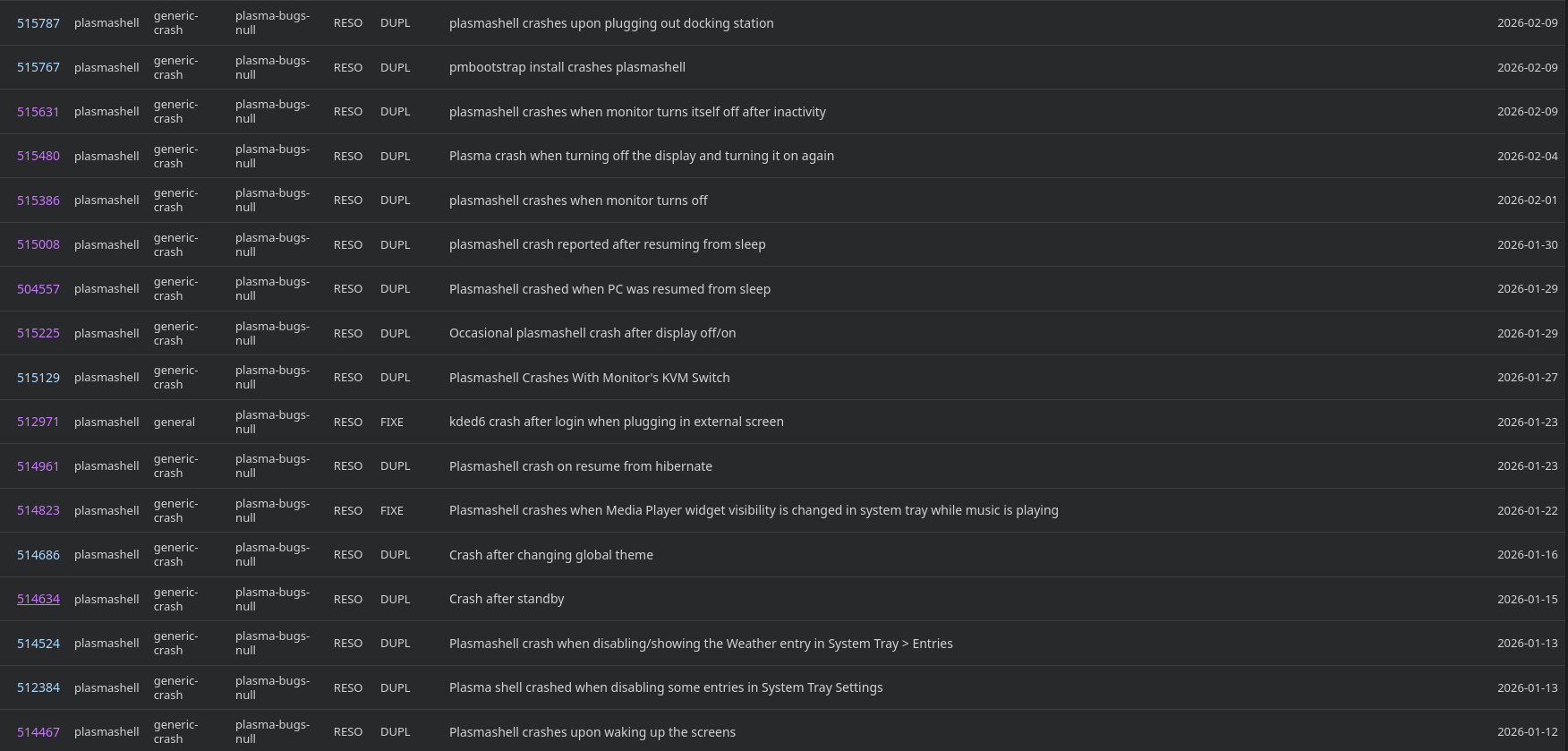
<p>A list of bugs that seem very relevant to the ones I had were listed. I kept my search between January and March of 2026, because that is roughly when I started noticing it got better.</p>

<p><img src="/assets/images/kde_bug_list.png" alt="Image" /></p>

<p>As you can see there is a lot of bugs <em>similar</em> to what I was experiencing during that time period. I could not find an exact match, but maybe different symptoms of the same disease. I narrowed the duplicates down to a few <em>root</em> bugs:</p>

<p>[https://bugs.kde.org/show_bug.cgi?id=511757]<br />
[https://bugs.kde.org/show_bug.cgi?id=514098]<br />
[https://bugs.kde.org/show_bug.cgi?id=506642]<br />
[https://bugs.kde.org/show_bug.cgi?id=500044]</p>

<p>Each had more than a few duplicate bugs tied to it.  I think [https://bugs.kde.org/show_bug.cgi?id=511757] seems like the closest to the one I experienced. It also had the most duplicates tied to it. It says it was resolved in a special 6.5.6 release, which was released in March. However, I wonder if it was also fixed in 6.6 which was released in February. I am not sure how the release schedule works, maybe there is a release schedule for those who do not want to go to 6.6.</p>

<h3 id="takeaways">Takeaways</h3>
<p>Did I find the commit that fixed my issue? No nor did I find a release note about it. Do I want to spend any more time looking? No, I feel satisfied with finding the bug logged and resolved. Did I learn something about KDE Plasma’s bug system and release schedule? Yes! Next time I run into a bug I will be able to log and check the status of it and maybe find people logging similar bugs. This is a better approach than trying to figure it out on my own or hoping for a release to fix it soon. As always thanks to all the KDE Plasma contributors and maintainers.</p>]]></content><author><name>Cam Murphy</name></author><summary type="html"><![CDATA[This post is following up on my previous post about a KDE Plasmashell crash issue I was experiencing. It has since been resolved, but not by any action I took. I am going to see if I can track down the change, commit, or release that fixed it.]]></summary></entry><entry><title type="html">Theme Upgrade!</title><link href="https://blog.cammurphy.com/2026/02/15/new-theme.html" rel="alternate" type="text/html" title="Theme Upgrade!" /><published>2026-02-15T00:00:00+00:00</published><updated>2026-02-15T00:00:00+00:00</updated><id>https://blog.cammurphy.com/2026/02/15/new-theme</id><content type="html" xml:base="https://blog.cammurphy.com/2026/02/15/new-theme.html"><![CDATA[<p>A year ago I published my <a href="https://blog.cammurphy.com/2025/02/28/one-month-with-sublime.html">first blog post</a>. So much has changed since then, and I have been using just the default Jekyll theme the entire time. I wanted something more, so I decided it was time to give the site a bit of an upgrade.</p>

<h3 id="why-a-new-theme">Why a New Theme?</h3>

<p>I liked the default <a href="https://github.com/jekyll/minima">minima theme</a>. However, it made the site look basic. I want the opportunity to grow and evolve the look and features of the blog as the content grows and evolves. I wanted to be able to make these changes with simple configuration updates and not intensive custom solutions that require css or code.</p>

<p>I also wanted to learn more about how themes, Jekyll, and ultimately Ruby works. I have a bare minimum knowledge of this platform, and I think it is time to learn more about the tool I am using.</p>

<h3 id="research">Research</h3>
<p>I  was not sure how to get a new theme for a Jekyll site. I started the search on the <a href="https://kagi.com/">internet</a>. The <a href="https://jekyllrb.com/docs/themes/">Jekyll site</a> turned out to be a good place to start. The first link on the site is a link to <a href="https://github.com/topics/jekyll-theme">GitHub with the topic jekyll-theme selected</a>. It lists theme repos created by developers, that are sorted by popularity.</p>

<p>The top two starred were themes for academic purposes. As you might have guessed, this is not an academic site. I figured these might contain features, that I do not need, and not prioritize features that I would use. I scrolled further.</p>

<p>The third one was called <a href="https://github.com/mmistakes/minimal-mistakes">Minimal Mistakes</a>. It has over 13k GitHub stars and a commit less than a few hours old. So, definitely a popular repository that still gets updated. Two important criteria. I scrolled quickly through screenshots and list of features. I decided to install it and give it a test run.</p>

<h3 id="installation">Installation</h3>

<p>The <a href="ttps://mmistakes.github.io/minimal-mistakes/docs/installation/">documentation site</a> supporting this theme has a very fleshed out installation section. Following the directions was simple. There was only one error I had to debug throughout the process. It was  due to my lack of familiarity with the Ruby ecosystem. Not an issue with Jekyll or Minimal Mistakes.</p>

<div class="language-plaintext highlighter-rouge"><div class="highlight"><pre class="highlight"><code>error: uninitialized constant Gem::Net::HTTP.
</code></pre></div></div>

<p>I tried just installing the net-http through gem. Same error.</p>

<p>I begrudgingly asked GitHub CoPilot <em>“why is this not working???”</em>. It recognized that my bundler version was 2.6.9 but in my lock file it was 2.6.7. I am not the versioning got into an inconsistent state.</p>

<p>After, <a href="https://stackoverflow.com/questions/61898186/how-to-bundle-install-gemfile-with-specific-version-of-bundler">installing with the bundler version that matched what was in my gemfile.lock</a>. I ran</p>
<div class="language-plaintext highlighter-rouge"><div class="highlight"><pre class="highlight"><code> bundle install
</code></pre></div></div>
<p>Success!</p>

<p>Then</p>
<div class="language-plaintext highlighter-rouge"><div class="highlight"><pre class="highlight"><code> bundle exec jekyll serve
</code></pre></div></div>
<p>The site loaded with the new theme on localhost:4000!</p>

<h3 id="configuration">Configuration</h3>

<p>The first configuration decision I would have to make was the skin. The minimal-mistakes theme comes with a few different “skins”: air, aqua, contrast, dark, dirt, neon, mint, plum, and sunrise. I tried a few… dark, neon, and sunrise. I ended up sticking with the default skin, because I find it easy to read black text on a white background. In the future, I would like the ability for a visitor to toggle light and dark mode.</p>

<p>The next was, search! All you need to do to implement site search is add the following line to _config.yml:</p>
<div class="language-plaintext highlighter-rouge"><div class="highlight"><pre class="highlight"><code>search: true
</code></pre></div></div>
<p>The default search implementation is <a href="https://lunrjs.com/">lunerjs</a>. A light-weight search engine akin to Solr.  A few test queries is enough to satisfy me. Minimal Mistakes themes provides good documentation on swapping out search providers if you are unsatisfied. I might look into that as the blog grows.</p>

<p>I decided to swap out the about page for a simple author profile sidebar. I like the author profile on the homepage and on each post instead of having it hiding on an about page. I also struggled with filling out an entire about page.</p>

<p>There are a boatload of other configuration choices to make. I might add comments or expected read times on the posts. Luckily, this setup allows me to easily add and remove features.</p>

<h3 id="but-it-works-locally">But It Works Locally!</h3>

<p>I had an issue deploying to GitHub Pages. It was a classic case of me not properly reading the documentation. When I initially tried to deploy out the new theme, I got the following <a href="https://github.com/CMURPH56/cmurph56.github.io/actions/runs/21695229536/job/62563923552#step:4:83">error</a>. TLDR: the theme minimal-mistakes-jekyll could not be found.</p>

<p>Luckily, the documentation provides an <a href="https://mmistakes.github.io/minimal-mistakes/docs/quick-start-guide/#remote-theme-method">easy fix</a>. In short you have to load the theme as a “remote_theme”. This works by GitHub downloading the theme gem and applying it to your site. You can see in the build <a href="https://github.com/CMURPH56/cmurph56.github.io/actions/runs/21695405075/job/62564457035#step:4:72">here</a> it downloads and applies the theme at build time.</p>

<h3 id="takeaways">Takeaways</h3>

<p>I am really happy with the new theme, thanks to the <a href="https://mademistakes.com/about/">developer Michael Rose</a>! It has been a fun year building the blog, and I look forward to continuing it.</p>]]></content><author><name>Cam Murphy</name></author><summary type="html"><![CDATA[A year ago I published my first blog post. So much has changed since then, and I have been using just the default Jekyll theme the entire time. I wanted something more, so I decided it was time to give the site a bit of an upgrade.]]></summary></entry><entry><title type="html">RSS to Kobo</title><link href="https://blog.cammurphy.com/2026/01/25/rss-to-kobo.html" rel="alternate" type="text/html" title="RSS to Kobo" /><published>2026-01-25T00:00:00+00:00</published><updated>2026-01-25T00:00:00+00:00</updated><id>https://blog.cammurphy.com/2026/01/25/rss-to-kobo</id><content type="html" xml:base="https://blog.cammurphy.com/2026/01/25/rss-to-kobo.html"><![CDATA[<p>Staying informed in 2026 without being overwhelmed is a daunting task. I have tried many methods from RSS readers to fully going print media. However, I recently found an imperfect flow that let me read the news on my Kobo, and it is my favorite solution so far.</p>

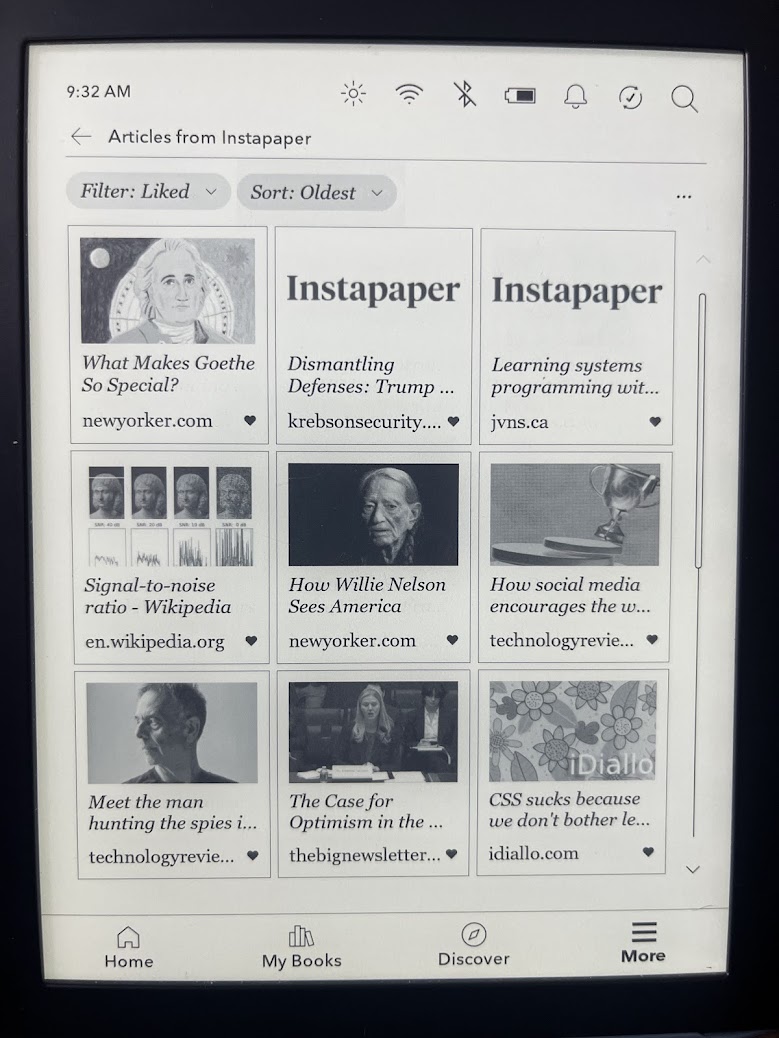
<p><img src="/assets/images/kobo_instapaper.jpg" alt="Image" /></p>

<h3 id="starting-with-rss">Starting with RSS</h3>
<p>I tried both <a href="https://www.inoreader.com/">Inoreader</a> and <a href="https://feedly.com/">Feedly</a>, through them I subscribed to news sources and tech blogs. This worked pretty well. I could keep up to date with local, national, and tech news in one place! However, the feed became overwhelming, I lost track or articles, and I wanted to get away from staring at a screen. This coincided with a wanting to be more <em>offline</em>, so I subscribed to print magazines and newspapers.</p>

<h3 id="switching-to-print">Switching to Print</h3>
<p>I subscribed to the <a href="https://chicago.suntimes.com/">Chicago Sun-Times</a>, <a href="https://www.economist.com/">The Economist</a>, and <a href="https://www.wired.com/">Wired Magazine</a>. I stuck with this for a while, but then a few issues started emerging:</p>

<ol>
  <li>I read less tech blogs or independent media that can only be found online.</li>
  <li>Reading paper magazine or newspapers in public is inconvenient.</li>
  <li>I would fall behind the latest news, and collected a large backlog of magazines and newspapers.</li>
</ol>

<p>I did not entirely give this up. I kept and renewed my Chicago Sun-Times paper subscription, because I like getting the newspaper in the morning.</p>

<h3 id="instapaper">Instapaper</h3>

<p>Ironically, I found out about <a href="https://www.instapaper.com/">Instapaper</a> because it emerged as a replacement after the death of <a href="https://support.mozilla.org/en-US/kb/future-of-pocket">Pocket</a>. I saw that Kobo started supporting an Instapaper account integration. I setup an  Instapaper account and started saving articles via the browser extension and through the Instapaper app, and they seamlessly appeared on my Kobo.</p>

<h3 id="inoreader---instapaper---kobo">Inoreader -&gt; Instapaper -&gt; Kobo</h3>

<p>So here it goes! Throughout the day, I’ll scroll through Inoreader (that has blogs and news accounts I subscribe to), read <a href="https://news.ycombinator.com/">news.ycombinator.com</a>, or receive a shared article from a friend and I will save that to my Instapaper account. Then when I have some downtime, I’ll sync my Kobo and scroll through and read the articles at my leisure. It is a more sane way to consume the news and easier on the eyes.</p>]]></content><author><name>Cam Murphy</name></author><summary type="html"><![CDATA[Staying informed in 2026 without being overwhelmed is a daunting task. I have tried many methods from RSS readers to fully going print media. However, I recently found an imperfect flow that let me read the news on my Kobo, and it is my favorite solution so far.]]></summary></entry><entry><title type="html">Advent Of Code</title><link href="https://blog.cammurphy.com/2026/01/03/advent-of-code.html" rel="alternate" type="text/html" title="Advent Of Code" /><published>2026-01-03T00:00:00+00:00</published><updated>2026-01-03T00:00:00+00:00</updated><id>https://blog.cammurphy.com/2026/01/03/advent-of-code</id><content type="html" xml:base="https://blog.cammurphy.com/2026/01/03/advent-of-code.html"><![CDATA[<h1 id="intro">Intro</h1>
<p>One of my goals for 2026 is to sharpen my skills as a programmer. Since my job change, I have focused more on networking, security, and cloud infrastructure than programming. Luckily this resolution coincides with the release of <a href="https://adventofcode.com/">Advent of Code</a>! So, I decided to attempt week one in Python.</p>

<h3 id="the-prompt">The Prompt</h3>
<p>You arrive at the secret entrance to the North Pole base ready to start decorating. Unfortunately, the password seems to have been changed, so you can’t get in. A document taped to the wall helpfully explains:</p>

<p>“Due to new security protocols, the password is locked in the safe below. Please see the attached document for the new combination.”</p>

<p>The safe has a dial with only an arrow on it; around the dial are the numbers 0 through 99 in order. As you turn the dial, it makes a small click noise as it reaches each number.</p>

<p>The attached document (your puzzle input) contains a sequence of rotations, one per line, which tell you how to open the safe. A rotation starts with an L or R which indicates whether the rotation should be to the left (toward lower numbers) or to the right (toward higher numbers). Then, the rotation has a distance value which indicates how many clicks the dial should be rotated in that direction.</p>

<p>So, if the dial were pointing at 11, a rotation of R8 would cause the dial to point at 19. After that, a rotation of L19 would cause it to point at 0.</p>

<p>Because the dial is a circle, turning the dial left from 0 one click makes it point at 99. Similarly, turning the dial right from 99 one click makes it point at 0.</p>

<p>So, if the dial were pointing at 5, a rotation of L10 would cause it to point at 95. After that, a rotation of R5 could cause it to point at 0.</p>

<p>The dial starts by pointing at 50.</p>

<p>You could follow the instructions, but your recent required official North Pole secret entrance security training seminar taught you that the safe is actually a decoy. The actual password is the number of times the dial is left pointing at 0 after any rotation in the sequence.</p>

<h3 id="getting-started">Getting Started</h3>
<p>I know I needed to keep track of two variables. One being the current number value of the dial I called <code class="language-plaintext highlighter-rouge">current_value</code> initialized to 50, and the other being the number of zeroes I called <code class="language-plaintext highlighter-rouge">zero_count</code> initialized to 0.</p>

<h3 id="reading-the-input">Reading the Input</h3>
<pre><code class="language-Python">with open('input.txt', 'r') as file:
    for line in file:
        line = line.strip()
</code></pre>
<h3 id="breaking-up-the-input">Breaking up the Input</h3>
<p>There are two things we care about on each line.</p>
<ol>
  <li>The direction the dial is turned</li>
  <li>How far it’s turned</li>
</ol>

<p>Luckily, there is a standard for this. The first character is a letter indicating the direction it is turned followed by any amount of integers which indicates how far it’s turned. I split those up like this:</p>

<pre><code class="language-Python">direction = line[0] # Gets the first character (the direction)
value_change = int(line[1:]) # Gets the value turned
</code></pre>

<h3 id="the-logic">The Logic</h3>

<p>So, here it goes. If the dial is turned to the right, I add the value to to the current value until it hits 100. Once it goes above 99, I subtract 100 and set the current value to the difference. Similarly, I subtract from the current value when the dial is turned to the left. Once it goes below zero, instead of going negative, I add 100 and set the current value to the sum. After a turning of the dial is complete, I check if it’s at 0 and increment the zero_count counter if it is.</p>

<pre><code class="language-Python">if(direction == 'R'):
    current_value += value_change
    if(current_value &gt; 99):
        current_value -= 100             
if(direction == 'L'):
    current_value -= value_change
    if(current_value &lt; 0):
        current_value += 100
if(current_value == 0):
    zero_count += 1

</code></pre>

<h3 id="the-test-data">The Test Data</h3>
<p>The Advent of Code people provided a sample set of data and the answer, with steps to walk through to get the answer. I plugged this into my code, and boom it worked! Time for my own input. I ran it and <em>oh no</em> it failed… The hint they provided me with was that my value was too low.</p>

<h3 id="my-mistake">My Mistake</h3>
<p>I scrambled trying to figure out what went wrong. After many print debugging statements and reviewing to see if I missed anything obvious, nothing. So, I decided to ask the super intelligent computer that we have all been gifted with it. It quickly pointed out <em>my mistake</em>, what I did not account for is if the dial is turned further than 100 in either direction. GitHub Copilot recommended I update my logic to the following:</p>

<pre><code class="language-Python">if line[0] == 'R':
    current_value = (current_value + value_change) % 100
elif line[0] == 'L':
    current_value = (current_value - value_change) % 100
</code></pre>
<p>Now it will get the remainder leftover after the current value is divided by 100, no matter how far the dial is turned.</p>

<h3 id="conclusion">Conclusion</h3>
<p>I think I would have figured my mistake out earlier when I was regularly programming. So, I am definitely rusty. However, I hope to shake off some of that rust this year. AI was very helpful in assisting me in finding my mistakes. Here is the final solution:</p>

<pre><code class="language-Python">zero_count = 0
current_value = 50

with open('input.txt', 'r') as file:
    for line in file:
        line = line.strip()
        direction = line[0]
        value_change = int(line[1:])
        if(direction == 'R'):
            current_value = (current_value + value_change) % 100           
        if(direction == 'L'):
            current_value = (current_value - value_change) % 100
        if(current_value == 0):
            zero_count += 1

print(f"final answer: {zero_count}")
</code></pre>]]></content><author><name>Cam Murphy</name></author><summary type="html"><![CDATA[Intro One of my goals for 2026 is to sharpen my skills as a programmer. Since my job change, I have focused more on networking, security, and cloud infrastructure than programming. Luckily this resolution coincides with the release of Advent of Code! So, I decided to attempt week one in Python.]]></summary></entry><entry><title type="html">KDE Plasma Crash Investigation</title><link href="https://blog.cammurphy.com/2025/12/14/kde-plasma-crash-investigation.html" rel="alternate" type="text/html" title="KDE Plasma Crash Investigation" /><published>2025-12-14T00:00:00+00:00</published><updated>2025-12-14T00:00:00+00:00</updated><id>https://blog.cammurphy.com/2025/12/14/kde-plasma-crash-investigation</id><content type="html" xml:base="https://blog.cammurphy.com/2025/12/14/kde-plasma-crash-investigation.html"><![CDATA[<h3 id="intro">Intro</h3>
<p>I have been running Fedora Linux with KDE as my chosen desktop environment on my personal computer for a while now. It has been a pretty smooth process. However, there has been one intermittent issue that has been bothering me.</p>

<h3 id="the-issue">The Issue</h3>

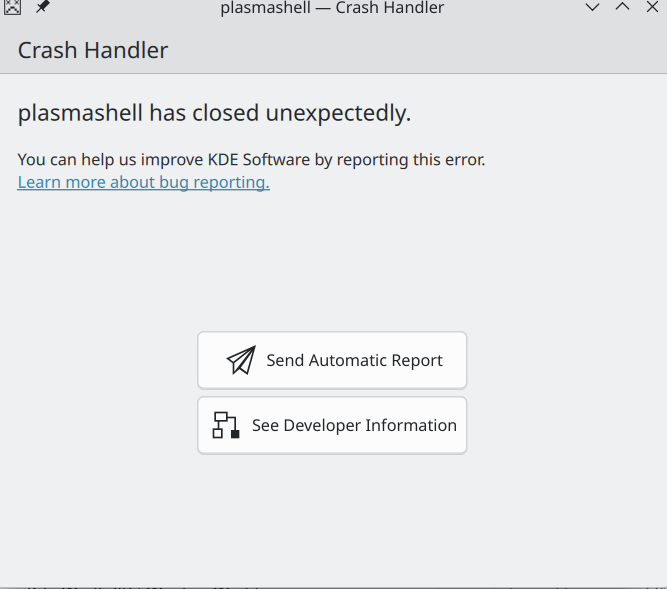
<p>Sometimes after logging into my laptop. This error would pop up and the taskbar would momentarily disappear.</p>

<p><img src="/assets/images/kde_issue.png" alt="Image" /></p>

<p>However, it would auto-resolve pretty quickly. So I never paid much attention to it. I have some time now, and I want to do a deeper investigation…</p>

<h3 id="read-the-damn-error">Read the Damn Error</h3>
<p>This is the best way to start troubleshooting. The main error title “plasmashell has closed unexpectedly” is obvious and not very helpful. Clicking into see developer information I get a stack that does not mean much to me. The full log can be found <a href="/assets/logs/error.txt">here</a>.</p>

<h4 id="first-section">First Section</h4>

<p>Here is a segment from the fist section. A lot of this is unable to open file <em>/memfd colon file name</em>. Looking at the <a href="https://man7.org/linux/man-pages/man2/memfd_create.2.html">Linux MAN Page</a>. It looks to be files that are created in RAM. So it looks like it might be some memory issue.</p>

<div class="language-plaintext highlighter-rouge"><div class="highlight"><pre class="highlight"><code>Application: plasmashell (plasmashell), signal: Aborted

warning: Can't open file /memfd:kwin-dmabuf-feedback-table (deleted) during file-backed mapping note processing
...
</code></pre></div></div>

<h4 id="second-section">Second Section</h4>
<p>The next “Section” of the log file was several lines of [New LWP (UID)]. I think LWP is referring to <a href="https://en.wikipedia.org/wiki/Light-weight_process">Light-weight Process</a>. So it is starting up some user level multi-tasking processes.</p>
<div class="language-plaintext highlighter-rouge"><div class="highlight"><pre class="highlight"><code>[New LWP 153331]
[New LWP 153385]
[New LWP 153345]
...
</code></pre></div></div>

<h4 id="third-section">Third Section</h4>

<p>This third section looks like where things really started to go wrong. It looks like most of threads that were started up in the previous section started erroring out. Here is the first and last part of the third sections:</p>

<div class="language-plaintext highlighter-rouge"><div class="highlight"><pre class="highlight"><code>[Thread debugging using libthread_db enabled]
Using host libthread_db library "/lib64/libthread_db.so.1".
Core was generated by `/usr/bin/plasmashell --no-respawn'.
Program terminated with signal SIGABRT, Aborted.
#0  0x00007f47686803cc in __pthread_kill_implementation () from /lib64/libc.so.6
[Current thread is 1 (Thread 0x7f4761f41f00 (LWP 153331))]
add symbol table from file "/lib64/libc.so.6"
add symbol table from file "/lib64/libKF6Crash.so.6"
add symbol table from file "/lib64/libQt6Core.so.6"
add symbol table from file "/lib64/libKF6ConfigCore.so.6"
add symbol table from file "/lib64/libKF6IconThemes.so.6"
add symbol table from file "/lib64/libQt6DBus.so.6"
add symbol table from file "/lib64/libQt6Widgets.so.6"
add symbol table from file "/lib64/libglib-2.0.so.0"
add symbol table from file "/usr/bin/plasmashell"
[Current thread is 51 (Thread 0x7f46d97fa6c0 (LWP 156231))]

...

Thread 1 (Thread 0x7f4761f41f00 (LWP 153331)):
[KCrash Handler]
#4  0x00007f47686803cc in __pthread_kill_implementation () from /lib64/libc.so.6
#5  0x00007f476862618e in raise () from /lib64/libc.so.6
#6  0x00007f476860d6d0 in abort () from /lib64/libc.so.6
#7  0x00007f476860e73b in __libc_message_impl.cold () from /lib64/libc.so.6
#8  0x00007f476868a665 in malloc_printerr () from /lib64/libc.so.6
#9  0x00007f476868b1fc in malloc_consolidate () from /lib64/libc.so.6
#10 0x00007f476868d7a8 in _int_malloc () from /lib64/libc.so.6
#11 0x00007f476868e259 in __libc_malloc2 () from /lib64/libc.so.6
#12 0x00007f4768e4b0a0 in QArrayData::allocate2(QArrayData**, long long, QArrayData::AllocationOption) () from /lib64/libQt6Core.so.6
#13 0x00007f4768e09822 in QString::QString(long long, Qt::Initialization) () from /lib64/libQt6Core.so.6
#14 0x00007f4768e20d02 in QUtf8::convertToUnicode(QByteArrayView) () from /lib64/libQt6Core.so.6
#15 0x00007f4768e02b1e in QString::fromUtf8(QByteArrayView) () from /lib64/libQt6Core.so.6
#16 0x00007f476a7901b5 in KConfigPrivate::lookupData(QString const&amp;, QAnyStringView, QFlags&lt;KEntryMap::SearchFlag&gt;, bool*) const () from /lib64/libKF6ConfigCore.so.6
#17 0x00007f476a79e368 in KConfigGroup::readPathEntry(char const*, QString const&amp;) const () from /lib64/libKF6ConfigCore.so.6
#18 0x00007f476a79e4f1 in KConfigGroup::readPathEntry(char const*, QList&lt;QString&gt; const&amp;) const () from /lib64/libKF6ConfigCore.so.6
#19 0x00007f4769e4171a in KIconTheme::KIconTheme(QString const&amp;, QString const&amp;, QString const&amp;) () from /lib64/libKF6IconThemes.so.6
#20 0x00007f4769e44790 in KIconLoaderPrivate::initIconThemes() [clone .part.0] () from /lib64/libKF6IconThemes.so.6
#21 0x00007f4769e2d35d in KIconLoaderPrivate::init(QString const&amp;, QList&lt;QString&gt; const&amp;) () from /lib64/libKF6IconThemes.so.6
#22 0x00007f4769e3b90b in KIconLoader::newIconLoader() () from /lib64/libKF6IconThemes.so.6
#23 0x00007f4769e2cefb in KIconLoaderPrivate::_k_refreshIcons(int) () from /lib64/libKF6IconThemes.so.6
#24 0x00007f4768d6759a in void doActivate&lt;false&gt;(QObject*, int, void**) () from /lib64/libQt6Core.so.6
#25 0x00007f4769e37177 in KIconLoaderGlobalData::qt_metacall(QMetaObject::Call, int, void**) () from /lib64/libKF6IconThemes.so.6
#26 0x00007f4769354f5e in QDBusConnectionPrivate::deliverCall(QObject*, QDBusMessage const&amp;, QList&lt;QMetaType&gt; const&amp;, int) () from /lib64/libQt6DBus.so.6
#27 0x00007f4768d58fcc in QObject::event(QEvent*) () from /lib64/libQt6Core.so.6
#28 0x00007f476b23db9f in QApplicationPrivate::notify_helper(QObject*, QEvent*) () from /lib64/libQt6Widgets.so.6
#29 0x00007f4768cfc4e8 in QCoreApplication::notifyInternal2(QObject*, QEvent*) () from /lib64/libQt6Core.so.6
#30 0x00007f4768cffb09 in QCoreApplicationPrivate::sendPostedEvents(QObject*, int, QThreadData*) () from /lib64/libQt6Core.so.6
#31 0x00007f476901efcf in postEventSourceDispatch(_GSource*, int (*)(void*), void*) () from /lib64/libQt6Core.so.6
#32 0x00007f47676eb2a3 in g_main_context_dispatch_unlocked.lto_priv () from /lib64/libglib-2.0.so.0
#33 0x00007f47676f41f8 in g_main_context_iterate_unlocked.isra () from /lib64/libglib-2.0.so.0
#34 0x00007f47676f43a3 in g_main_context_iteration () from /lib64/libglib-2.0.so.0
#35 0x00007f476901e80d in QEventDispatcherGlib::processEvents(QFlags&lt;QEventLoop::ProcessEventsFlag&gt;) () from /lib64/libQt6Core.so.6
#36 0x00007f4768d09063 in QEventLoop::exec(QFlags&lt;QEventLoop::ProcessEventsFlag&gt;) () from /lib64/libQt6Core.so.6
#37 0x00007f4768d04819 in QCoreApplication::exec() () from /lib64/libQt6Core.so.6
#38 0x000055d3ba35698d in main ()   
</code></pre></div></div>

<h3 id="ask-ai">Ask AI</h3>
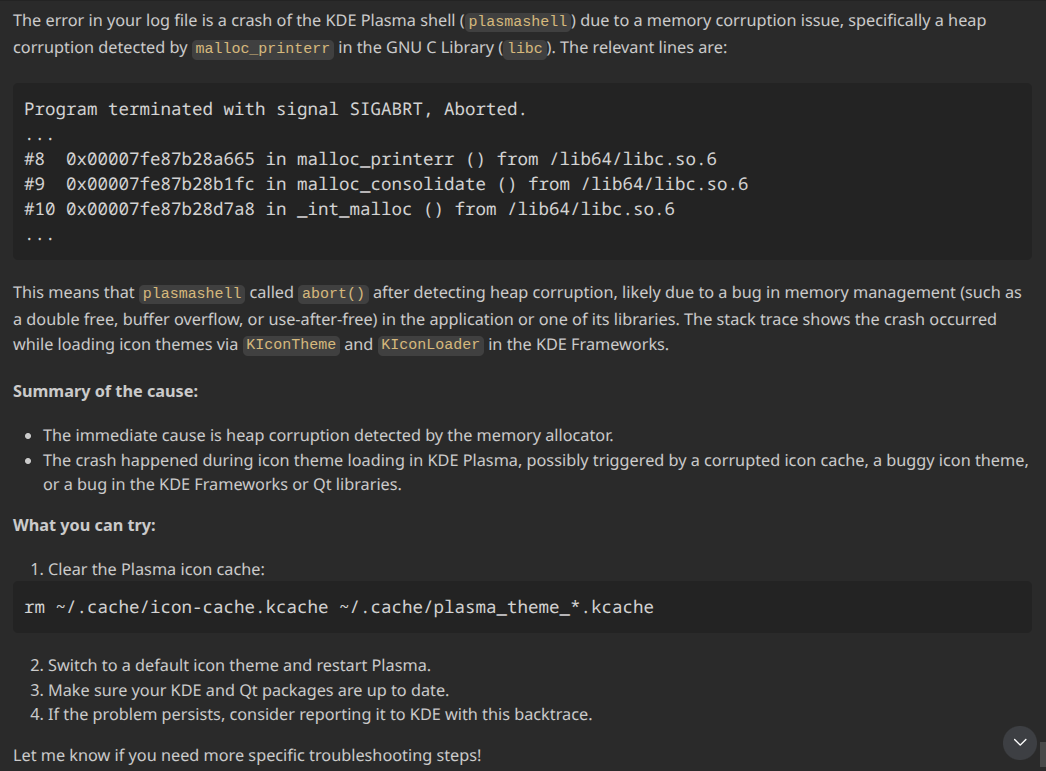
<p>Since it is the year 2025, I asked AI. I wanted to see if it could go through the entire stack trace and identify some information that could help! Note: I have written thoughts about <a href="https://blog.cammurphy.com/2025/08/31/Artificial-Intelligence.html">AI previously</a>. Here is what GPT-4.1 came up with:</p>

<p><img src="/assets/images/AI_Debugging.png" alt="Image" /></p>

<p>Ah, of course! Looking at the last section of the stack it does throw a lot of errors pertaining to icons and themes, that also explains why the task bar temporarily dissapears. Here is more information on what <a href="https://api.kde.org/legacy/pykde-4.5-api/kdeui/KIconLoader.html">KIconLoader</a> does.</p>

<h3 id="mitigation">Mitigation</h3>

<p>I am going to follow the AI recommended steps here.</p>
<ol>
  <li>Clear the Plasma icon cache.<br />
a. Easy to do. However; I am not sure about this, since it is a re-occurring issue.</li>
  <li>Switch to a default icon theme and restart plasma.<br />
a. I am not using a non-default theme (I am using breeze dark / breeze light depending on the time of day)</li>
  <li>Make sure your KDE and Qt packages are up to date.<br />
a. I regularly update the packages on here.</li>
</ol>

<h3 id="other-thoughts">Other thoughts</h3>

<p>I am wondering if this is a bug with the automatic theme switcher that I enabled with the <a href="https://kde.org/announcements/plasma/6/6.5.0/">Plasma 6.5 release</a>. Although, I am on the most recent KDE Version at the current moment (6.5.4), and I do not see any comments about it in the <a href="https://kde.org/announcements/changelogs/plasma/6/">release logs</a>.</p>

<h3 id="final-conclusion">Final Conclusion</h3>
<p>Maybe clearing the cache fixed my issue. I will follow up with more information in a later blog post.</p>]]></content><author><name>Cam Murphy</name></author><summary type="html"><![CDATA[Intro I have been running Fedora Linux with KDE as my chosen desktop environment on my personal computer for a while now. It has been a pretty smooth process. However, there has been one intermittent issue that has been bothering me.]]></summary></entry><entry><title type="html">Cloudflare Turnstile</title><link href="https://blog.cammurphy.com/2025/11/30/cloudflare-turnstile.html" rel="alternate" type="text/html" title="Cloudflare Turnstile" /><published>2025-11-30T00:00:00+00:00</published><updated>2025-11-30T00:00:00+00:00</updated><id>https://blog.cammurphy.com/2025/11/30/cloudflare-turnstile</id><content type="html" xml:base="https://blog.cammurphy.com/2025/11/30/cloudflare-turnstile.html"><![CDATA[<h3 id="intro">Intro</h3>

<p>This is another free service from Cloudflare. I decided to add to my site, because why not!</p>

<h3 id="cloudflare-dashboard">Cloudflare Dashboard</h3>

<ol>
  <li>Log into your <a href="https://dash.cloudflare.com/login">Cloudflare Account</a></li>
  <li>On the left nav go to <em>Application Security</em> -&gt; <em>Turnstile</em></li>
  <li>Click <em>Add Widget</em></li>
  <li>Name your widget</li>
  <li>Add the Hostnames you would like to cover</li>
  <li>I chose <em>Managed</em> for Widget Mode</li>
  <li>Opting out of pre-clearence for now. I might tackle this in a future blog post. However, cf_clearence cookie I found in my <a href="https://blog.cammurphy.com/2025/11/16/adding-cookies-to-the-cookie-jar.html">last blog post</a> makes a re-appearence.</li>
  <li>Click <em>Create Widget</em></li>
</ol>

<h3 id="in-the-html">In The HTML</h3>

<p>I am mostly following <a href="https://developers.cloudflare.com/turnstile/get-started/client-side-rendering/">Cloudflare Documentation</a>.</p>

<p>I ended up adding the following HTML to my <a href="https://www.cammurphy.com/">website</a> and the blog you are reading now:</p>

<pre><code class="language-HTML">      &lt;div 
        class="cf-turnstile" 
        data-sitekey="&lt;site-id&gt;"  
        data-theme="light"
        data-size="normal"
        data-callback="onSuccess"&gt;
      &lt;/div&gt;
</code></pre>

<p>This worked! However, it did not really fit with the styling for my website. So, I changed the widget mode option to invisible.</p>

<p>Now it keeps the flow of the site without the interruption of the visible widget. This is fine for my low traffic informational website.</p>]]></content><author><name>Cam Murphy</name></author><summary type="html"><![CDATA[Intro]]></summary></entry><entry><title type="html">Adding Cookies To The Cookie Jar</title><link href="https://blog.cammurphy.com/2025/11/16/adding-cookies-to-the-cookie-jar.html" rel="alternate" type="text/html" title="Adding Cookies To The Cookie Jar" /><published>2025-11-16T00:00:00+00:00</published><updated>2025-11-16T00:00:00+00:00</updated><id>https://blog.cammurphy.com/2025/11/16/adding-cookies-to-the-cookie-jar</id><content type="html" xml:base="https://blog.cammurphy.com/2025/11/16/adding-cookies-to-the-cookie-jar.html"><![CDATA[<h3 id="the-cookie-jar">The Cookie Jar</h3>

<p>I know the browser stores cookies on your machine. I also know that websites can set and check them. However, I was not sure how and where they are stored. It turns out cookies for Firefox are stored in a cookies.sqlite database in the browser’s profile folder. The profile folder can be found by typing about:profiles into the Firefox address bar.</p>

<p><strong>Checking the Cookie Jar</strong><br />
I wanted to see what this database of cookies looked like, so I downloaded a <a href="https://sqlitebrowser.org/">DB Client for SQLite</a>. I tried just opening the cookies.sqlite file in SQLite Browser but ran into an error:</p>

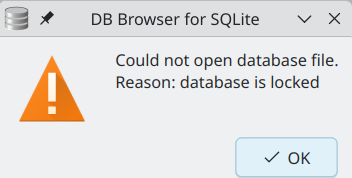
<p><img src="/assets/images/databaseError.png" alt="Image" /></p>

<p>It looks like the Firefox process has a lock on it, and I could not read from it. I had to copy the file to a different folder and then I was able to open and read the contents.</p>

<p>Examining the database file, there are around 3,000 entries for cookies! I found only one cookie attributed to my domain of *.cammurphy.com and that was the <a href="https://developers.cloudflare.com/cloudflare-challenges/concepts/clearance/">cf_clearence cookie</a>, which I guess means Cloudflare is sufficiently happy I am not a robot.</p>

<h3 id="adding-cookies">Adding Cookies!</h3>

<p>To add a cookie to <a href="https://www.cammurphy.com/">www.cammurphy.com</a> I added the following simple JavaScript code:</p>

<div class="language-javascript highlighter-rouge"><div class="highlight"><pre class="highlight"><code><span class="kd">var</span> <span class="nx">now</span> <span class="o">=</span> <span class="k">new</span> <span class="nb">Date</span><span class="p">();</span>
<span class="kd">var</span> <span class="nx">oneYear</span> <span class="o">=</span> <span class="k">new</span> <span class="nb">Date</span><span class="p">(</span><span class="nx">now</span><span class="p">);</span>
<span class="nx">oneYear</span><span class="p">.</span><span class="nx">setFullYear</span><span class="p">(</span><span class="nx">now</span><span class="p">.</span><span class="nx">getFullYear</span><span class="p">()</span> <span class="o">+</span> <span class="mi">1</span><span class="p">);</span>
<span class="nb">document</span><span class="p">.</span><span class="nx">cookie</span> <span class="o">=</span> <span class="dl">"</span><span class="s2">cookie=welcomeToCamsWebsite; expires=</span><span class="dl">"</span> <span class="o">+</span>  <span class="nx">oneYear</span><span class="p">.</span><span class="nx">toUTCString</span><span class="p">()</span> <span class="o">+</span> <span class="dl">"</span><span class="s2">; path=/</span><span class="dl">"</span><span class="p">;</span>
</code></pre></div></div>

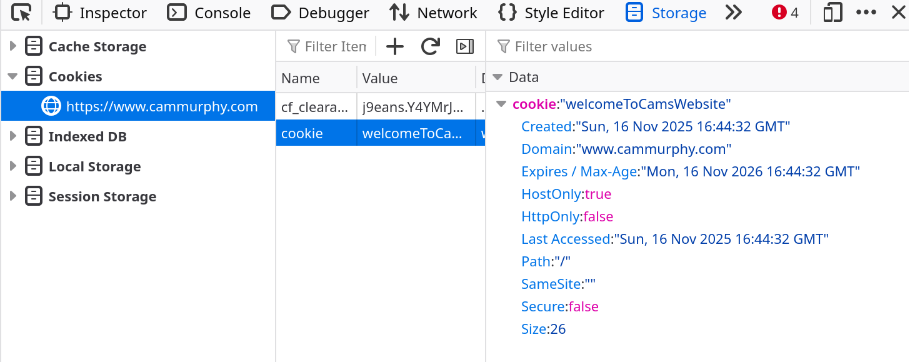
<p><strong>Checking the cookie in the browser, I see it:</strong></p>

<p><img src="/assets/images/cookiesBrowser.png" alt="Image" /></p>

<p><strong>I also see it querying cookies.sqlite:</strong></p>

<p><img src="/assets/images/cookiesSQLite.png" alt="Image" /></p>

<p>Overall, it is a pretty simple process to set and check a simple cookie. I think it is more interesting to see how you can use them and how to secure them. That will be in later posts.</p>

<p>References</p>

<p><a href="https://developer.mozilla.org/en-US/docs/Web/HTTP/Guides/Cookies">https://developer.mozilla.org/en-US/docs/Web/HTTP/Guides/Cookies</a></p>

<p><a href="https://developer.mozilla.org/en-US/docs/Web/API/Document/cookie">https://developer.mozilla.org/en-US/docs/Web/API/Document/cookie</a></p>]]></content><author><name>Cam Murphy</name></author><summary type="html"><![CDATA[The Cookie Jar]]></summary></entry><entry><title type="html">HSTS Headers</title><link href="https://blog.cammurphy.com/2025/10/30/hsts-headers.html" rel="alternate" type="text/html" title="HSTS Headers" /><published>2025-10-30T00:00:00+00:00</published><updated>2025-10-30T00:00:00+00:00</updated><id>https://blog.cammurphy.com/2025/10/30/hsts-headers</id><content type="html" xml:base="https://blog.cammurphy.com/2025/10/30/hsts-headers.html"><![CDATA[<p>The purpose of this blog post is to learn about HSTS headers and how they work, with a side product of better securing my sites.</p>

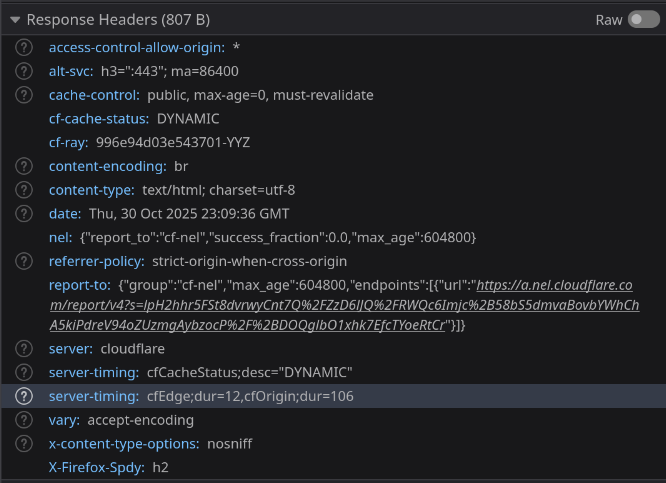
<p>Before I wrote this post:<br />
<img src="/assets/images/HSTS_Before.png" alt="Image" /></p>

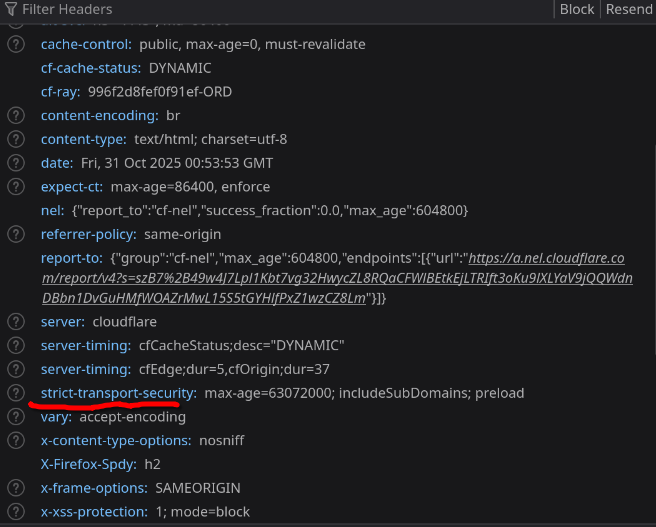
<p>After I wrote this post:<br />
<img src="/assets/images/HSTS_After.png" alt="Image" /></p>

<h2 id="what-is-an-hsts-header">What is an HSTS Header</h2>
<p><a href="https://developer.mozilla.org/en-US/docs/Web/HTTP/Reference/Headers/Strict-Transport-Security">HSTS</a> stands for HTTP Strict-Transport-Security. When the browser initially requests a web page, the server will include in its response a header with the instructions “Hey browser remember this domain, and always load it over https and auto-upgrade http to https”.</p>

<h2 id="adding-hsts-headers-to-cammurphycom">Adding HSTS Headers to *.cammurphy.com</h2>
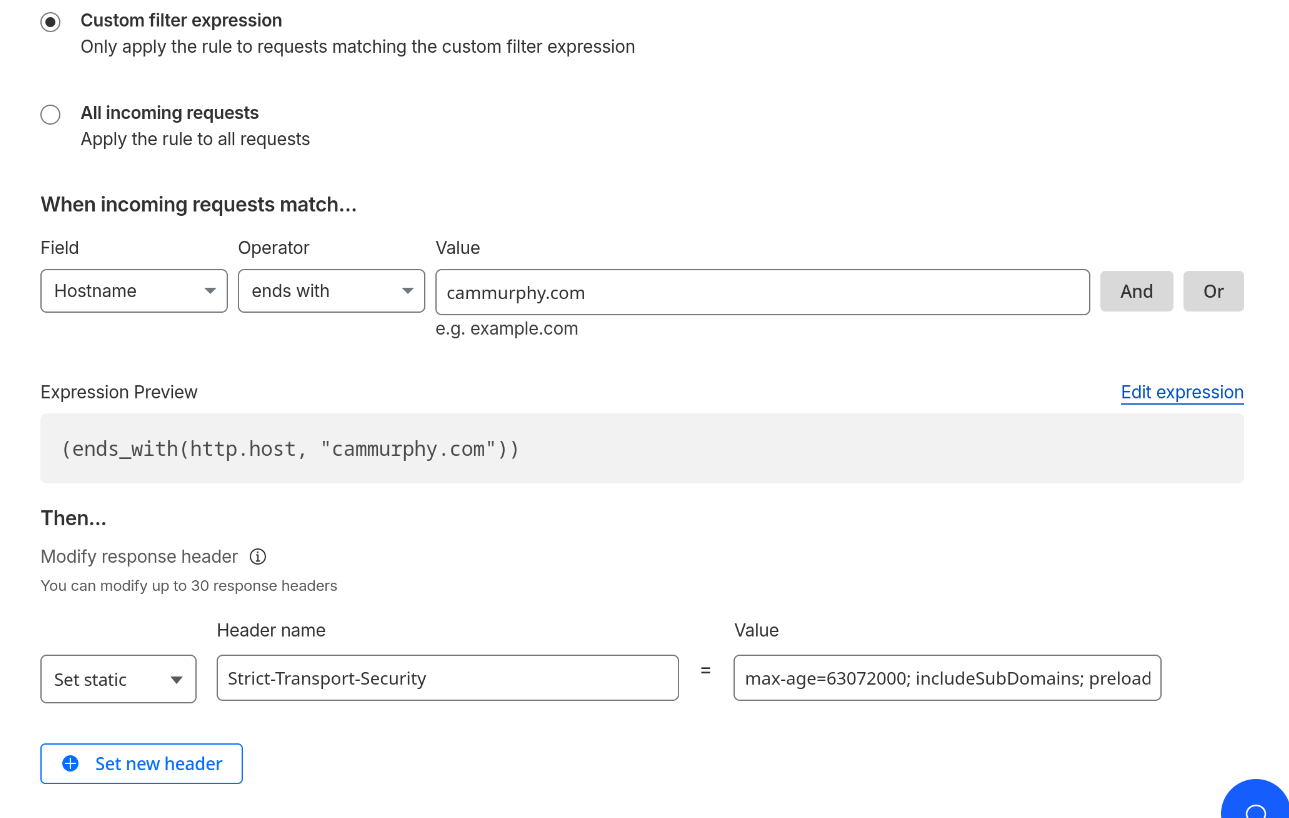
<p>I chose to add HSTS headers via a transform rule in Cloudflare.</p>

<p><img src="/assets/images/HSTS_Subdomains_Preload.png" alt="Image" /></p>

<h3 id="the-options">The options!</h3>

<p><strong>Required</strong><br />
Max-Age: The unit of measurement is seconds. I set this to the recommended two years.</p>

<p><strong>Not Required</strong><br />
IncludeSubdomains: I added this, because I wanted www.cammurphy, blog.cammurphy, and etc to have the same security.</p>

<p>preload: With adding this option you allow the domain to be added to the preload list. The preload list is what browsers will check if it should load the site without even having to get the initial response from the server. You can submit your domain to be added to the list <a href="https://hstspreload.org/">here</a>.</p>

<h2 id="seeing-it-for-myself">Seeing it for myself</h2>
<p>I was interested to see how and where the browser was storing this list that checks if the domain must be loaded over https. I use firefox, by typing about:profiles in your address bar you can see where the firefox profile folder is. In that folder there is a SiteSecurityServiceState.bin file that is filled with random HEX gibberish. I had to install a Hex editor, I chose GHex because this came up in results as someone having a <a href="https://sim642.eu/blog/2024/08/10/firefox-hsts-bypass/">similar issue</a>. After seaching, boom I found cammurphy.com.</p>

<p><img src="/assets/images/Hex_Of_My_Domain.png" alt="Image" /></p>

<h2 id="why-hsts-headers">Why HSTS Headers</h2>
<p>It prevents bad actors on a public network from pretending to be your site and capturing requests over an insecure connection in a man in the middle attack.</p>

<h3 id="thank-you">Thank You!</h3>

<p>Thanks to these posts that helped along me along with my HSTS journey.<br />
https://developer.mozilla.org/en-US/docs/Web/HTTP/Reference/Headers/Strict-Transport-Security<br />
https://hstspreload.org/<br />
https://sim642.eu/blog/2024/08/10/firefox-hsts-bypass/</p>]]></content><author><name>Cam Murphy</name></author><summary type="html"><![CDATA[The purpose of this blog post is to learn about HSTS headers and how they work, with a side product of better securing my sites.]]></summary></entry><entry><title type="html">Round Robin And Sticky Sessions</title><link href="https://blog.cammurphy.com/2025/09/30/round-robin-and-sticky-sessions.html" rel="alternate" type="text/html" title="Round Robin And Sticky Sessions" /><published>2025-09-30T00:00:00+00:00</published><updated>2025-09-30T00:00:00+00:00</updated><id>https://blog.cammurphy.com/2025/09/30/round-robin-and-sticky-sessions</id><content type="html" xml:base="https://blog.cammurphy.com/2025/09/30/round-robin-and-sticky-sessions.html"><![CDATA[<h3 id="what-is-round-robin-and-what-are-sticky-sessions">What is Round-robin and what are sticky sessions?</h3>
<p>Round-robin and sticky sessions are a way to load balance servers. Load balancers spread client requests across multiple servers.</p>

<h3 id="why-load-balance-and-not-just-have-a-bigger-server">Why load balance and not just have a bigger server?</h3>
<p>Load balancing is good for improving performance and availability. Spreading requests across multiple servers allows for a fresh server to respond to a request and not one that is already tied up handling a request from a different client. Also, if a server becomes unhealthy or unresponsive it can be pulled manually or automatically from the load balancer and put back when it is healthy again.</p>

<h3 id="round-robin">Round-robin</h3>

<p>In round-robin load balancing, when a client makes a request the response will come from a server that is on a list of servers. The server that responds is chosen in sequential order. Even multiple requests from the same client could be routed to a different sever each time. This is great for evenly distributing traffic between a group of servers. However, an issue comes into play when you need state management.</p>

<h3 id="state">State</h3>

<p>The web is inherently stateless. In it’s simplest form the client makes a request to the server, the server handles the request and responds to the client. The server keeps no memory of this interaction. This is great for sites like blog.cammurphy.com, because no user history is required. However, it does not work well for sites like Facebook that you need to login for.</p>

<p>A strategy to deal with this is, store information about the client on a servers memory <em>such as is the client authenticated?</em>. Subsequent requests will check the servers memory see if it is an authenticated client and proceed in kind. However, memory is not shared among servers. If the next request is routed to a different server, the client who was logged in will show as logged out because they are not in this servers memory. Leading to frustration among users who have to constantly log back in. This is where sticky sessions come in.</p>

<h3 id="sticky-sessions">Sticky sessions</h3>

<p>One way to implement sticky sessions is on initial request from a client to a server. The server will respond with the regular response, but in addition it will set a cookie on the browser indicating what server responded. So now for subsequent requests the load balancer will check for a cookie and route to the same server that did the initial response. This will allow the client to utilize the on server memory set before. While also keeping load balancing for requests coming from different clients. There are better ways to maintain sessions for a client, but this is a way to do it on the networking level.</p>]]></content><author><name>Cam Murphy</name></author><summary type="html"><![CDATA[What is Round-robin and what are sticky sessions? Round-robin and sticky sessions are a way to load balance servers. Load balancers spread client requests across multiple servers.]]></summary></entry><entry><title type="html">Artificial Intelligence</title><link href="https://blog.cammurphy.com/2025/08/31/Artificial-Intelligence.html" rel="alternate" type="text/html" title="Artificial Intelligence" /><published>2025-08-31T00:00:00+00:00</published><updated>2025-08-31T00:00:00+00:00</updated><id>https://blog.cammurphy.com/2025/08/31/Artificial-Intelligence</id><content type="html" xml:base="https://blog.cammurphy.com/2025/08/31/Artificial-Intelligence.html"><![CDATA[<p>In early 2023, I like others was first introduced to ChatGPT. After playing around with it for a bit, I wrote it off as a novelty/curiosity and did not predict the overwhelming force it has become today.</p>

<h2 id="concerns--criticisms">Concerns / Criticisms</h2>

<h3 id="ethical">Ethical</h3>
<p>The main ethical issue is AI companies are using synthesized information from people’s work and <a href="https://www.npr.org/2025/01/14/nx-s1-5258952/new-york-times-openai-microsoft">not properly crediting or compensating them</a>. I realize legally it may fall under fair use. However, to build a product or service based off the work of others and marketing it as your own seems insincere.</p>

<h3 id="environmental">Environmental</h3>
<p>I think the environmental concerns are obvious. AI’s data centers are <a href="https://www.economist.com/business/2025/07/28/how-big-tech-plans-to-feed-ais-voracious-appetite-for-power">power hungry</a>, and we are already struggling to produce enough green energy to support out current energy grid. On top of energy uses, it also requires a lot of water to cool the data centers. This raises <a href="https://chicago.suntimes.com/environment/2025/08/20/data-centers-ai-artificial-intelligence-chicago-illinois-great-lakes-michigan-drinking-water-jb-pritzker">concerns about how and what water will be used</a>. I know there are answers to these questions, but I fear the need for rapid growth will supersede thoughtful regulation.</p>

<h3 id="societal">Societal</h3>
<p>This concerns is less straight forward and more ambiguous. There are articles written that indicate people who rely heavily on AI experience <a href="https://www.economist.com/science-and-technology/2025/07/16/will-ai-make-you-stupid">less of a cognitive workload</a>, which may cause brains to atrophy. Perhaps even more concerning is people turning to AI for emotional support. I know AI is not to blame for the <a href="https://www.wired.com/story/couples-retreat-with-3-ai-chatbots-and-humans-who-love-them-replika-nomi-chatgpt/">loneliness epidemic</a> or <a href="https://xeiaso.net/blog/2025/who-assistant-serve/">lack of accessible therapy</a>. However, the solution that it provides these people in need is dubious.</p>

<h2 id="how-i-use-ai">How I use AI</h2>
<p>Despite these concerns I believe there is a place and a benefit to this tool and it is simply to use it as a tool.</p>

<h3 id="assistant">Assistant</h3>
<p><a href="https://www.youtube.com/watch?v=LCEmiRjPEtQ">This video</a> was transformational about how the way I think about AI. I like how Andrej Karpathy likens AI to a tool like the Iron Man suit complete with Jarvis, it is something to extend your cognitive function and productivity not replace it. It led me to  one of the primary ways I use AI as a search tool. The AI has access to documentation, chats, tickets, and emails. When I am working on something it is a super power to pull up all relevant notes on the subject with a simple natural language query. I will say that I have to check what the source material it is referencing actually says because it can misrepresent facts.</p>

<p>Additionally I use it for coding, it is remarkably easier to ask Copilot something in the side window than switch to a browser and find a helpful Stack Overflow article. I admit I am behind on agents, because I have not been able to give concise enough language to generate code I like.</p>

<h3 id="editor">Editor</h3>
<p>On top of using AI as an assistant. I also like to use it as an editor. For example, if I want an email with a certain tone I’ll work back and forth with AI to craft a good email. I’ll also use to edit blog posts for proper grammar or phrasing. Finally, I’ll use it to review the code that I write to see if there was anything I missed.</p>

<h2 id="conclusion">Conclusion</h2>
<p>I think AI can be a powerful too in your tool chest. I am less it is as revolutionary as the marketing hype will lead you to believe, but I have underestimated it before.</p>]]></content><author><name>Cam Murphy</name></author><summary type="html"><![CDATA[In early 2023, I like others was first introduced to ChatGPT. After playing around with it for a bit, I wrote it off as a novelty/curiosity and did not predict the overwhelming force it has become today.]]></summary></entry></feed>